The translation on this website may be generated by machine translation. The quality and accuracy of machine translation can vary significantly from one text to another. Read the page in original English here.
Find an overview of the Off-System Request queue and learn how to track requests between your library and a library or organization that is not using an OCLC resource sharing solution within the Tipasa staff interface.
Select whether you are using the Legacy interface or the Modernized interface in Tipasa.
Track requests between your library and a library or organization that is not using an OCLC resource sharing solution within the Tipasa staff interface. These off-system partners typically use email as their primary form of request communication and do not have access to a protocol-compliant ILL system.
Use the off-system request queues to track all requesting activity within Tipasa.
As a borrower, manage requesting, receiving, and returning materials from an off-system lender.
As a lender, manage reviewing, responding, sending, and processing returns from your collection to an off-system borrower.
Review off-system requests in your library's Borrower/Lender Resources Sharing Stats Report in OCLC Usage Statistics.
Note: If you are using Circulation Integration with Tipasa, these settings extend to off-system requests, allowing for these requests to update within your circulation system as well. Refer to Circulation Integration for more information.
Off-System request workflow
Create the off-system lending or borrowing request.
Update off-system request details as necessary.
Change the status of the request as necessary.
If the settings for Circulation Integration are enabled, enter a temporary barcode to trigger a message to your local Circulation system.
Add updates from the off-system partner using Staff Notes.
Use the Email button to send emails to the off-system partner and to the library patron if necessary.
Review the Request History drop-down and Staff Notes tab for information about the request.
Use OCLC Usage Statistics to track your off-system requests.
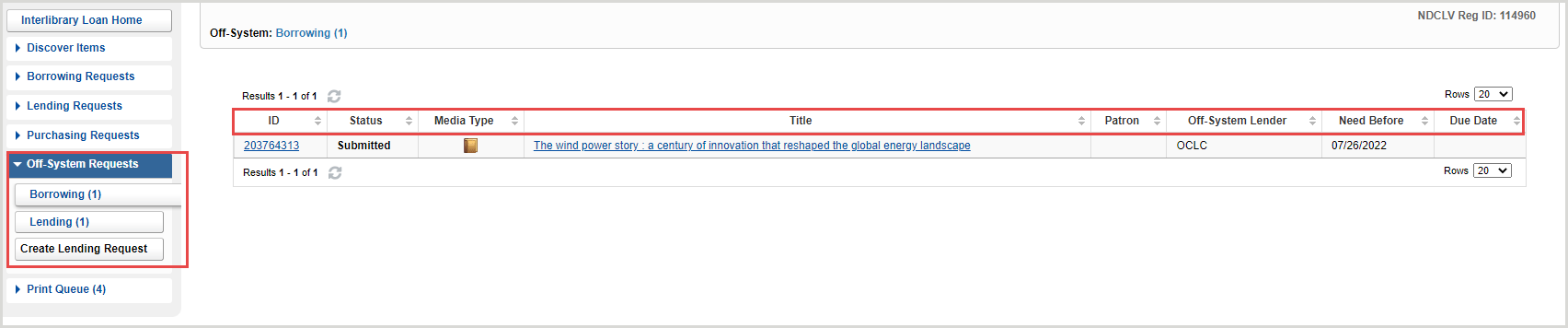
Off-system requests appear in dedicated queues for borrowing and lending within the Tipasa.
Within each queue, all active off-system requests are displayed together and can be sorted by the following column headings:
Request ID
Status
Media Type
Title
Patron (Borrowing only)
Off-System Borrower or Off-System Lender
Need Before
Due Date
Off-System request display
Off-system requests include the request details, bibliographic details, lender or borrower information, and request history.
Since the partner institution will communicate outside of the Tipasa system, staff will need to manually update information in the request. All fields in the off-system request are editable throughout the active lifetime of the request. Staff will also need to manually update any status updates for the request by using the Change Status button.
Track requests between your library and a library or organization that is not using an OCLC resource sharing solution within the Tipasa staff interface. These off-system partners typically use email as their primary form of request communication and do not have access to a protocol-compliant ILL system.
Use the off-system request queues to track all requesting activity within Tipasa.
As a borrower, manage requesting, receiving, and returning materials from an off-system lender.
As a lender, manage reviewing, responding, sending, and processing returns from your collection to an off-system borrower.
Review off-system requests in your library's Borrower/Lender Resources Sharing Stats Report in OCLC Usage Statistics.
Note: If you are using Circulation Integration with Tipasa, these settings extend to off-system requests, allowing for these requests to update within your circulation system as well. Refer to Circulation Integration for more information.
Off-System request workflow
Create the off-system lending or borrowing request.
Update off-system request details as necessary.
Change the status of the request as necessary.
If the settings for Circulation Integration are enabled, enter a temporary barcode to trigger a message to your local Circulation system.
Add updates from the off-system partner using Staff notes.
Use the Email button to send emails to the off-system partner and to the library patron if necessary.
Review the Request history and Staff notes tabs for information about the request.
Use OCLC Usage Statistics to track your off-system requests.
Off-system requests appear in dedicated queues for borrowing and lending within the Tipasa.
Within each queue, all active off-system requests are displayed together and can be sorted by the following column headings:
ID
Status
Media type
Title
Patron (Borrowing only)
Off-system borrower or Off-system lender
Need before
Due date
Off-System request display
Off-system requests include the request details, bibliographic details, lender or borrower information, and request history.
Since the partner institution will communicate outside of the Tipasa system, staff will need to manually update information in the request. All fields in the off-system request are editable throughout the active lifetime of the request. Staff will also need to manually update any status updates for the request by using the Change Status button.