Set preferences for bibliographic records
- Working with records: Bibliographic Records tab - Image
-
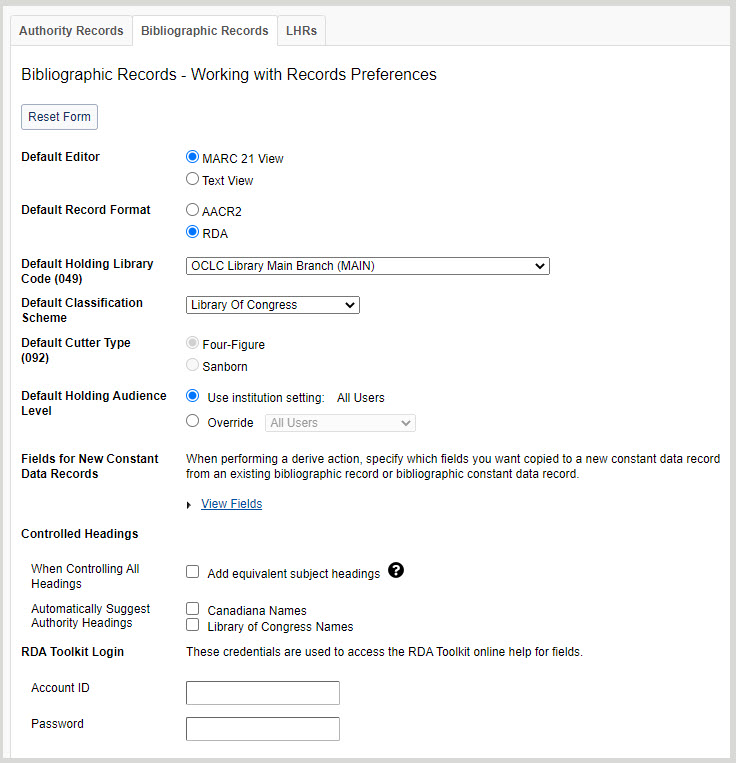
- For Default Editor, select a default record editor.
- MARC 21 View
- Text View
- For Default Record Format, select a default record format.
- AACR2
- RDA
- For Default Holding Library Code (049), select a holding library code from the drop-down list.
Note: The list of available locations is specific to the locations available for your institution. The default option is the default from the Holding Library Code list from the database. This code is for bibliographic records, saved work in-progress records, and local holdings records.
- For Default Classification Scheme, select a classification scheme from the drop-down list.
- None of the following
Note: Select in the case that your institution doesn't use any of the other classification schemes in the list, e.g., because you use a local classification scheme.
- Library of Congress (default)
- Dewey Decimal
Note: When creating labels or adding LHRs, the system will first look for a call number in an 092 field (locally assigned DDC). If none is present, it will look for a call number in 082 (DDC assigned number). This also applies to corresponding fields to an LC call number. The system will first look for a locally assigned LC number in 090; if none is present, it will look for a call number in 050 (LC number)
- National Library of Medicine
- Canadian National Library
- Government Document
- National Agricultural Library
- Universal Decimal
- None of the following
- For Use Metadata AI Enrichment Service, choose which classifications/subject headings you would like to receive AI-provided suggestions for. All options are deselected by default.
- Dewey Call Numbers (DDC)
- Library of Congress Call Numbers (LCC)
- Library of Congress Subject Headings (LCSH)
- For Default Cutter Type (092), select a cutter type.
- Four-Figure (default)
- Sanborn
- For Default Holding Audience Level, select whether to use the audience level specified in the institution settings or to override with a different audience level from the drop-down list.
Note: This option is available to WMS libraries only. For more information, see WorldCat holdings audience levels.
- For Fields for New Constant Data Records, select the fields and field groups you want to include in the record.
- For Controlled Headings:
- Enable or disable adding equivalent subject headings when controlling all headings in a record. By default, Add equivalent subject headings is disabled.
- When enabled, the system checks for uncontrolled headings present in a bibliographic record and tries to control the headings against the appropriate authority files and then attempts to add equivalent subject headings for the controlled headings if the record contains controlled RVM, AAT, LCSH, or MeSH headings. If equivalent subject headings are found, they are controlled to their respective authority file.
- When disabled, the system only checks for uncontrolled headings present in a bibliographic record and tries to control the headings against the appropriate authority files.
Note: Although the system attempts to control all headings when you add or replace a bibliographic record, it will only attempt to add equivalent subject headings when you select Control All Headings from the Record menu in the bibliographic record.
- Enable or disable auto-suggestions for Canadiana Names and Library of Congress Names. By default, auto-suggest is enabled. When enabled, auto-suggestions for field-appropriate Canadiana and Library of Congress Names start with the first keystroke in new and existing records whose: Auto-suggested headings are automatically controlled when selected. If you are editing an existing field, you must first follow the procedure to remove a link from a controlled heading in a MARC 21 record.
- 040 field subfield $b is identified as French ($b fre) for Canadiana Names.
- 040 field subfield $b is identified as English ($b eng) for Library of Congress Names.
- 100, 110, 111, 130, 700, 710, 711, 730, 800, 810, 811, and/or 830 field is blank.
- Enable or disable adding equivalent subject headings when controlling all headings in a record. By default, Add equivalent subject headings is disabled.
- If you are profiled for RDA Toolkit authentication via account ID and password, enter your Account ID and Password.
- For Default Export Method, choose how you would like to export your records:
- TCP/IP
- Export List
- Click Save.