If your library does not have an OCLC Cataloging and Metadata Subscription, the collections available in your knowledge base in Collection Manager will be limited to OCLC cataloged collections. OCLC cataloged collections are knowledge base collections cataloged by OCLC staff and are made available through Collection Manager by the provider.
See the OCLC cataloged collections page for a list of providers with collections from which you can receive records.
If your library has a CatExpress subscription, please see Options for libraries with a CatExpress subscription.
Sign in to the WorldShare interface at your library's WorldShare https://www.oclc.org/support/help/tu...ons/index.html. Replace yourlibrary with your library's identifier: https://yourlibrary.share.worldcat.org/wms
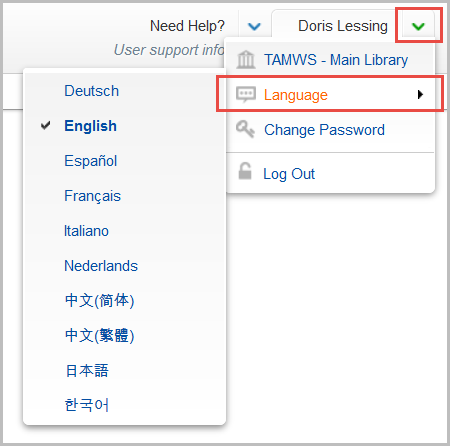
The Setup Wizard is available in the following languages:
If the interface does not appear in your preferred language, select the language of your choice:
Choose a method to add or create a knowledge base collection:
Record delivery is available both to libraries with and to libraries without an OCLC Cataloging and Metadata Subscription.
Enable MARC record delivery in the institution settings
Once you enable record delivery, tabs of settings will appear: Customize Records, WorldCat Updates, Record Delivery, Cataloging Partner Options. You can leave the default settings or customize your records. By default, the following will be included in your records:
Customize your record profile (optional)
Define customizations that will apply across your collections in the Customize Records tab. For additional information, see Configure institution MARC Records settings for knowledge base collections.
By default, the following fields and data will be included in your records:
Frequently defined record customization:
Delete Fields:
Add Fields:
Knowledge Base Collection 856 Field:
Enable collection-level record setting
Search for the collection and open it. Expand the Holdings and MARC Records accordion.
After you enable record delivery in the collection, you will see the following tabs of settings: Customize Records, Record Delivery. You can leave the default settings or configure collection-level settings.
Configure collection-level settings (optional)
Define collection-level settings if desired. Listed below are some frequently used settings. For additional information, see Enable record delivery within your collection.
Many libraries choose to have their file of records delivered in a separate file. To configure separate file delivery:
This setting acts as a filter to filter out from record delivery titles that you have set holdings on through some process outside of Collection Manager.
By default, you will receive a full set of records for the titles in the collection. Your initial batch of records will have a record for every title. The default setting is:
If you do not want records for items you already have holdings on in WorldCat, you can choose to have those titles withheld from record delivery. Change the setting to Do not include records already held in WorldCat and you will only receive records that do not already have your holding attached in WorldCat.
Note: If you choose not to have records output for titles you already hold in WorldCat, we recommend that you change this setting back to "Include new records already held in WorldCat" after you receive your first delivery.
PDF version. Also available in: français | español | 한국어 | 中文(简体) | 中文(繁體)
Download your files and records using My Files, located under the Metadata tab in the WorldShare interface. You do not need additional credentials to download records from the WorldShare interface.
See Download files in My Files for complete instructions or follow these basic steps:
Additionally, see Download files with FTP for FTP/sFTP options for downloading files and records.
Estimated time to complete: 20 minutes
This course demonstrates how to work with OCLC cataloged collection in WorldShare Collection Manager, including searching, selecting and managing collections, as well as how to download your files of records for your selected collections.
Launch courseFor help understanding the contents of emailed record reports, see Understand emailed reports, Record reports.
Collection Manager has many features. However, because your access to Collection Manager is for the exclusive purpose of receiving records, some functionality will not be available.