
WorldShare Reports in Power BI release notes, November 2026
Release Date: 5 November 2026
Introduction
This release of WorldShare Reports in Power BI provides a new standard report and an updated interface. These features will help you manage more complex workflows, including:
- View titles and items with open holds in Power BI using the new Open Holds report.
- Download your report files from an updated, more accessible My Files screen.
Follow-up actions
In an effort to keep your staff informed of new features and changes, you may also want to consider these items.
| Action |
|---|
|
Reporting staff may want to refer to the 30 January 2025 release notes and the OCLC help documentation to familiarize themselves with the Power BI reports and general features, including exporting, bookmarking, and report favoriting. |
|
Circulation staff who use the Open Holds report in WorldShare Reports (BusinessObjects) may want to start using the new Open Holds report in Power BI. Both versions will be available during the transition period. |
|
Staff who download files from My Files will see an updated screen. Let your staff know that the screen looks different, but the files available to them and the steps to download them are the same. |
New features and enhancements
Open Holds report for WMS libraries
You can now view a detailed list of the titles and items with open holds at your library using the new Open Holds standard report in Power BI. Previously, this report was available only in our WorldShare Reports (BusinessObjects) environment.
The Power BI report will replace the BusinessObjects version, but there are some small differences in the logic between the two reports:
- In both reports, a hold only shows if its Hold Needed Before Date is today or later. Beyond that, the two versions decide which holds count as open slightly differently. BusinessObjects showed holds whose Hold Expiration Date was today or later. Power BI instead shows holds with no Hold On Hold Date, meaning holds that haven’t been put on the hold shelf yet.
- BusinessObjects made you enter a Hold Request Placed Date range before the report would run. Power BI shows all holds by default, whenever they were placed, and you can still apply a date range in the Filters pane.
You can filter the report by:
- Item Material Format
- Item Branch Name
- Hold Request Placed Date
- Item Permanent Shelving Location
- Item Temporary Shelving Location
- Patron Borrower Category
Example of the new Open Holds report:

Visit Open Holds for additional information and workflows.
Updated My Files screen
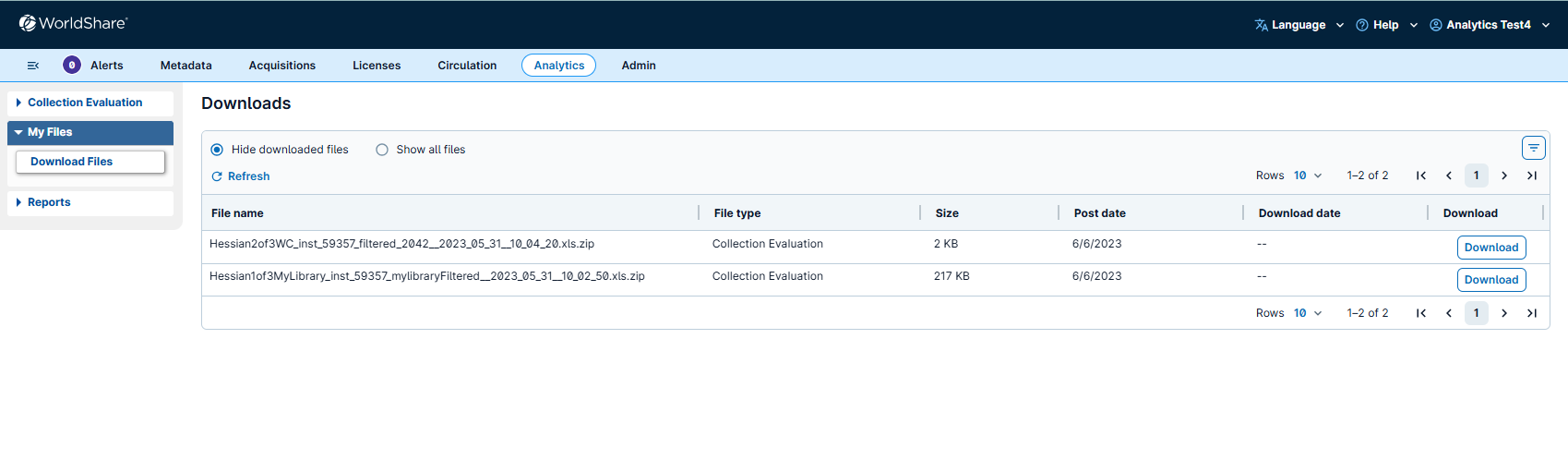
The My Files screen has been updated to improve accessibility. The updated screen now matches the My Files screen in WorldShare Metadata, so you will see a consistent experience across both applications.
From Analytics > My Files, you can continue to:
- Filter your files by type, such as WorldShare Reports or Collection Evaluation files.
- Choose Hide downloaded files or Show all files.
- Select Download to download a file.
Example of the updated My Files screen:
 Visit Retrieve a scheduled custom or standard report using My Files for additional information and workflows.
Known issues
See the Known Issues page.
Important links
Support website(s)
Support information for this product and related products can be found at:
Learning opportunities
Join us to ask questions about this release:
- Office Hours: WorldShare Reports — 19 November 2026, 11:00 AM – 12:00 PM ET