Plan budget
Overview
The first step in setting up a new budget should be taking time to carefully plan the budget details. You cannot delete a budget once it is created, therefore it is recommended to carefully consider the constraints and consequences of creating a test budget or test orders before doing so. You can read about these under Considerations for test budgets. Consider creating a planning document or spreadsheet to keep track of your decisions in advance of entering the budget in WorldShare Acquisitions. Some details you should decide on before creating the budget are:
- The duration of the budget and specific start and end dates.
Note: The duration of a budget can be set to 6 months, 1 year, or 2 years.
- The fund level structure.
- Fund names, codes, and statuses.
- The amount to budget for each fund.
Planning start and end dates
When thinking about the start and end dates of your budget, first decide when you would like to start your budget. You can start a budget at the beginning of a fiscal year, or mid-fiscal year.
Beginning of the fiscal year start
To start your budget at the beginning of your next fiscal year, you can simply enter the start date as the first day of the fiscal year. Next, select a budget period. The end date of your budget will be automatically populated based on the length of the budget period you choose. You can adjust the end date of the budget to whenever you want after creating the budget. Available starting budget periods are:
- 6 months
- 1 year (most common)
- 2 years
Mid-fiscal year
If you want to start using Acquisitions sometime in the middle of your fiscal year or during your fiscal year, there are a few options:
- Option 1: Pre-date the start date of the budget to the beginning of the current fiscal year, but enter budget amounts based on the remaining balance of funds in your current system.
Note: If you plan to move over any open orders from an old system to WMS, these may already be counted against your remaining balance in the old system. To ensure your budgeted amounts are accurate, you will want to add these back to the budgeted amount in WMS.
- Option 2: Set the start date of the budget to sometime during the current fiscal year, and enter the budgeted amounts based on the remaining balance of funds in your current system. You can adjust the end date after creating the budget.
- Option 3: Choose option 1 or 2, but set the budgeted amount to be the full amount for the year and create placeholder invoices to charge what is expended and create order items for open encumbrances.
Planning budget structure
- Example of fund level hierarchy - Image
-
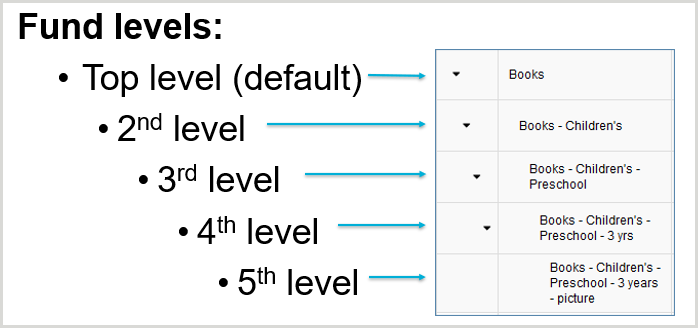
The structure of your budget is designed using funds and fund levels. You can create up to five levels of funds in a budget. When considering fund levels, keep in mind that:
- Only the top-level fund is required. Adding second, third, fourth, and fifth levels are optional.
- A second-level fund is a child to its top-level fund parent; a third-level fund is a child to its second-level fund parent, etc.
- You may choose to create a budget with only top-level funds, or with a combination of fund levels. You may also choose to make your top-level fund's container funds for their child funds. In other words, you don’t add a budgeted amount for the top-level container fund but would divide the top-level amount among its child funds.
- There is no limit to the number of funds you can have at any level.
- You can set funds at any level to Enabled
 (which is the default), Disabled for New Transactions
  (this excludes order or invoice items that use the fund before you set this status), or Disabled for All Uses
  . If you decide to set your budget up using the top-level funds as container funds, you should set these to Disabled for all uses as you’re creating the budget so that they are not accidentally selected on orders and invoices.
Setting up funds
For each fund, you need to enter a Fund Name, Fund Code, Fund Status, and Budgeted Amount. The Fund Code must be unique for that Budget, but the Fund Name and Budgeted Amount may be duplicated. For example, you may have a fund called Books under both the English fund and the Geography fund. Before creating your budget, make note of the details below for each of your funds.
- Fund Name: Choose a fund name that is descriptive and easy to read. Keep in mind:
- In the budget, funds are listed alphabetically by top-level fund name and then alphabetically by second level fund name, etc.
- On orders and invoices, all levels display alphabetically by fund name regardless of fund level.
- Avoid using the same name for different funds, or precede a fund name by using the parent fund name first (e.g. "Books - Monographs" and "Law - Monographs").
- Fund Code: You have numerous options for determining a fund code. Some suggestions:
- A shortened form of the Fund Name (e.g. EngBks for the English Books budget).
- The identifier used by your institution's financial system (e.g. PeopleSoft, SAP). This allows the Fund Code to be used as a match point between the two systems.
- A combination of the above (e.g. EngBks-001234).
- Fund Status: You can select Enabled (default), Disabled for New Transactions , or Disabled for All Uses .
- Budgeted Amount: There are multiple options for entering the Budgeted Amount. Considerations:
- If you are creating the budget for your next fiscal period and plan to begin using Acquisitions at the beginning of this budget period, then use the full budgeted amount for that fiscal period. For example, if you have $1,000 designated for the next budget period, enter 1,000.00.
- If you are creating the budget for the current fiscal period (which has already begun), you may want to use the remaining balance for the fund as your Budgeted Amount, instead of the full amount budgeted for that period. For example, if you had budgeted $1,000 for a fund but have already spent $500, you may want to enter 500.00 as the Budgeted Amount, since it is the amount remaining to be spent in the fiscal period.
Considerations for test budgets
Even after planning all details in advance, you may still want to create a test budget, particularly if you will be implementing integrations with third-party vendors. This allows you to test out vendor file imports and invoice exports. When creating a test budget, it is important to keep the following in mind:
- A test budget period should be short (e.g. one month).
- Set the end date for the test budget to one day before when you want your usable budget to start.
- The test budget and all orders, order items, invoices, and invoice items created for the test will remain in the system indefinitely.
- All test data associated with the budget must be marked as such and left out of any reports.